最新帖子
#71
Wichtige Informationen / Wichtige Infos zum Shop
最后一个帖子由 Eirik - 4月 21, 2026, 05:25 下午Seit wir den Shop im März eröffnet haben, haben wir viel positives Feedback bekommen, aber auch Fragen von Spielern, ob das Krigsgaldr-Projekt zu einem "Pay to Win" oder "Pay to Play"-Host geworden ist.
Die kurze Antwort ist:
NEIN, das Krigsgaldr-Projekt ist KEIN "Pay to Play"- oder "Pay to Win"-Host geworden!
Die kurze Antwort ist:
NEIN, das Krigsgaldr-Projekt ist KEIN "Pay to Play"- oder "Pay to Win"-Host geworden!
- Items im Shop können nicht mit Geld gekauft werden, sondern mit Token, die du auf verschiedene Weise verdienen kannst. Mehr Infos, wie du sie bekommst.
- Alle Items im Shop kann man auch ingame durch normales Spielen bekommen.
- Es gibt keine Items im Shop, die eine besondere Beziehung zu irgendeiner Fraktion brauchen.
- Es gibt keine Items im Shop, die einen bestimmten Beruf voraussetzen.
- Es gibt keine Heroic-Items im Shop. Um Heroic-Items anzulegen und zu tragen, finden wir, dass du zeigen solltest, dass du ein echter Held bist, indem du die nötigen Quests oder Raids machst, um das Item zu bekommen, und stolz deine Erfolge präsentierst.
- In Zukunft bieten wir vielleicht "Donor-Items" an. Das wären Items, die nur von Donatoren bekommen werden können und nicht ingame als Belohnung für Quests und Raids verfügbar sind. Diese Items werden jedoch als Donor-Items gekennzeichnet sein und dem Besitzer keinen Vorteil gegenüber anderen Spielern verschaffen, damit für alle faires Spiel gewährleistet ist.
#72
Wichtige Informationen / Wie man auf Legion Realms zock...
最后一个帖子由 Eirik - 4月 21, 2026, 05:23 下午Der "Einherjar" Server, Legion 7.3.5, Rev. 26792, ist momentan im geschlossenen "Beta"-Status und nur für ausgewählte Spieler verfügbar, um Stabilität und Fehler zu testen, bevor er für die Öffentlichkeit freigegeben wird.
Geplanter Start ist in den letzten Tagen des zweiten Quartals 2026. Halt Ausschau nach deinen Emails. Wir melden uns bei dir, sobald du loslegen kannst.
Du kannst dich aber gerne für das Beta-Testen des Servers bewerben. Öffne dazu ein Ticket, wähl in der Kategorie "Technical" aus und schreib uns ein paar Zeilen, warum wir dich für den Testserver auswählen sollen. Beachte, dass du Legion 7.3.5, Rev. 26792 installiert haben musst, mit einer gepatchten wow.exe, die Verbindungen zu privaten Servern erlaubt. Wenn du angenommen wirst, melden wir uns bei dir mit den Login-Daten.
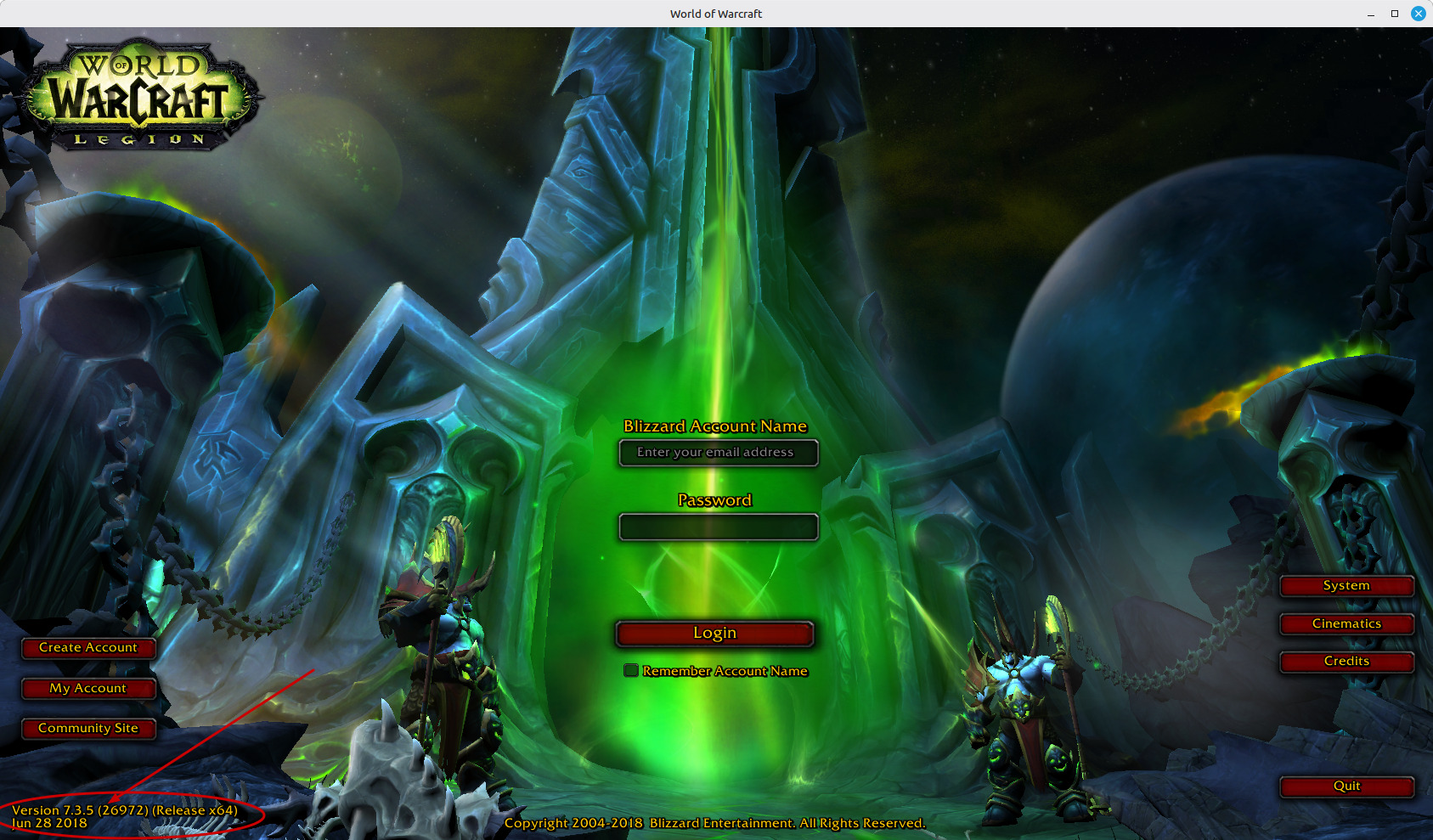
Zum Öffnen des Bildes in einem neuen Tab klicken.
Geplanter Start ist in den letzten Tagen des zweiten Quartals 2026. Halt Ausschau nach deinen Emails. Wir melden uns bei dir, sobald du loslegen kannst.
Du kannst dich aber gerne für das Beta-Testen des Servers bewerben. Öffne dazu ein Ticket, wähl in der Kategorie "Technical" aus und schreib uns ein paar Zeilen, warum wir dich für den Testserver auswählen sollen. Beachte, dass du Legion 7.3.5, Rev. 26792 installiert haben musst, mit einer gepatchten wow.exe, die Verbindungen zu privaten Servern erlaubt. Wenn du angenommen wirst, melden wir uns bei dir mit den Login-Daten.
Zum Öffnen des Bildes in einem neuen Tab klicken.
#73
Wichtige Informationen / Wie man auf den Wrath of the L...
最后一个帖子由 Eirik - 4月 21, 2026, 05:20 下午Es gibt mehrere Wege, auf den WOTLK Realms zu spielen. (Aktuell "Orrosta")
1. Du hast Wrath of the Lich King bereits installiert. Stell sicher, dass du Version 3.3.5, Revision 12340 hast.
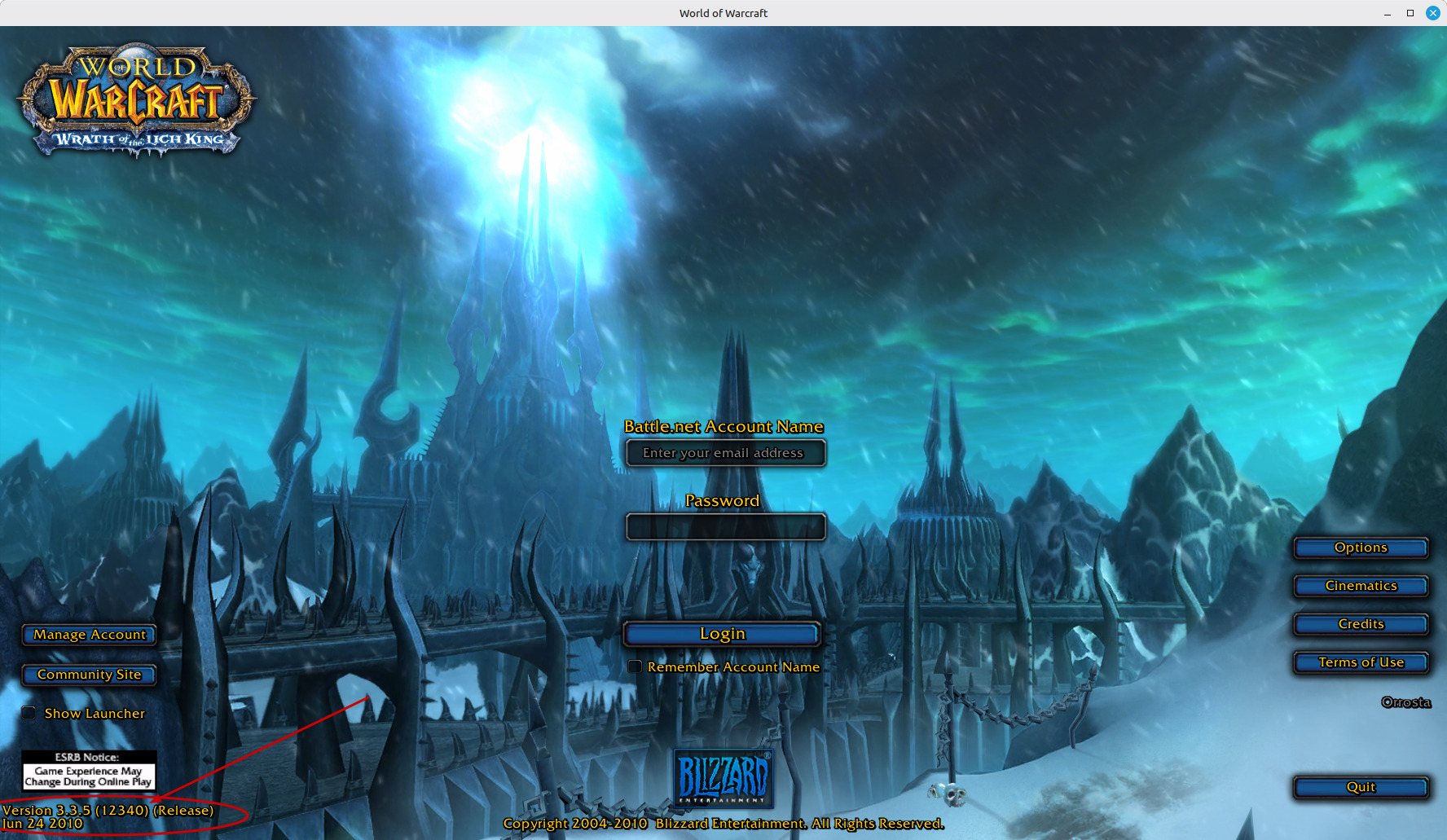
Zum Öffnen in einem neuen Tab klicken.
Öffne die config.wtf, die im "WTF"-Verzeichnis liegt, wo dein WOW installiert ist.
SET realmList "logon.krigsgaldr.net"
Lade Client-Updates (falls vorhanden), spezifisch für unsere WOTLK-Server, herunter und lege sie in das Data-Verzeichnis.
Stelle sicher, dass du auf dem Server, auf dem du spielen möchtest, ein Konto über dein Kontrollzentrum erstellt hast.
2. Du willst spielen, hast aber keinen Game-Client.
Lad dir einen über die Links unten runter. Falls du das Archiv nicht entpacken kannst, empfehlen wir 7zip, das du hier runterladen kannst.
ACHTUNG: DAS IST NUR DER GAME-CLIENT UND FUNKTIONIERT OHNE SPRACHDATEIEN NICHT!!! DU MUSST AUCH UNTEN DIE SPRACHDATEIEN FÜR DEINE SPRACHE RUNTERLADEN, DAS ARCHIV EXTRAHIEREN UND DEN ENTSTANDENEN ORDNER IN DAS DATA-VERZEICHNIS DEINES GAME-CLIENTS LEGEN!!!
Game-Client für Windows, WOTLK 3.3.5, 12340 (Lade ALLE Dateien runter):
Download bei MEGA
MEGA
Alternativer Download via Torrent (Eine Datei):
Game-Client für MAC, WOTLK 3.3.5, 12340 (Hinweis: Diese Version wird nicht unterstützt und könnte mit einer aktuellen modernen MAC-OS nicht funktionieren. Probier's einfach aus, sonst musst du vielleicht eine Workaround finden, um die Windows-Version zu nutzen). (Lade ALLE Dateien runter):
Download bei MEGA
Alternativer Download via Torrent (Eine Datei):
Lade Client-Updates (falls vorhanden), spezifisch für unsere WOTLK-Server, herunter und lege sie in das Data-Verzeichnis.
Stelle sicher, dass du auf dem Server, auf dem du spielen möchtest, ein Konto über dein Kontrollzentrum erstellt hast.
Sprachdateien:
deDE 🇩🇪 (Deutsch), (Du musst ALLE Dateien runterladen!)
Download bei MEGA
Alternativer Download via Torrent (Eine Datei):
enGB 🇬🇧 (Britisches Englisch), (Du musst ALLE Dateien runterladen!)
Download bei MEGA
Alternativer Download via Torrent (Eine Datei):
enUS 🇺🇸 (Amerikanisches Englisch), (Du musst ALLE Dateien runterladen!)
Download bei MEGA
Alternativer Download via Torrent (Eine Datei):
esES 🇪🇸 (Español Europeo), (Du musst ALLE Dateien runterladen!)
Download bei MEGA
Alternativer Download via Torrent (Eine Datei):
esMX 🇲🇽 (Español Latino), (Du musst ALLE Dateien runterladen!)
Download bei MEGA
Alternativer Download via Torrent (Eine Datei):
frFR 🇫🇷 (Français), (Du musst ALLE Dateien runterladen!)
Download bei MEGA
Alternativer Download via Torrent (Eine Datei):
ruRU 🇷🇺 (Русский), (Du musst ALLE Dateien runterladen!)
Download bei MEGA
Alternativer Download via Torrent (Eine Datei):
koKR 🇰🇷 (한국어), (Du musst ALLE Dateien runterladen!)
Download bei MEGA
Alternativer Download via Torrent (Eine Datei):
zhCN 🇨🇳 (简体中文), (Du musst ALLE Dateien runterladen!)
Download bei MEGA
Alternativer Download via Torrent (Eine Datei):
1. Du hast Wrath of the Lich King bereits installiert. Stell sicher, dass du Version 3.3.5, Revision 12340 hast.
Zum Öffnen in einem neuen Tab klicken.
Öffne die config.wtf, die im "WTF"-Verzeichnis liegt, wo dein WOW installiert ist.
代码 [选择]
        📁  World of Warcraft/
        │
        ├── 🔧 Wow.exe (und andere Spiel-Dateien)
        │
        ├── 📁 Data/
        │    │  └── Hier Update-Patches ablegen
        │    │
        │    └─ 📁 deDE/
        │      │
        │      ├── 📁 Documentation
        │      │        └── Enthält Handbücher für WoW-Neulinge
        │      ├── 📁 Interface
        │      │        └── Enthält Spiel-Dateien
        │      └── Alle Sprachdateien
        │
        ├── 📁 Interface/
        │        └── 📁 Addons
        │                └── Hier Addons ablegen
        │
        └── 📁 WTF/
                └── Config.wtf
Stell sicher, dass die erste Zeile genau so aussieht:SET realmList "logon.krigsgaldr.net"
Lade Client-Updates (falls vorhanden), spezifisch für unsere WOTLK-Server, herunter und lege sie in das Data-Verzeichnis.
Stelle sicher, dass du auf dem Server, auf dem du spielen möchtest, ein Konto über dein Kontrollzentrum erstellt hast.
2. Du willst spielen, hast aber keinen Game-Client.
Lad dir einen über die Links unten runter. Falls du das Archiv nicht entpacken kannst, empfehlen wir 7zip, das du hier runterladen kannst.
ACHTUNG: DAS IST NUR DER GAME-CLIENT UND FUNKTIONIERT OHNE SPRACHDATEIEN NICHT!!! DU MUSST AUCH UNTEN DIE SPRACHDATEIEN FÜR DEINE SPRACHE RUNTERLADEN, DAS ARCHIV EXTRAHIEREN UND DEN ENTSTANDENEN ORDNER IN DAS DATA-VERZEICHNIS DEINES GAME-CLIENTS LEGEN!!!
Game-Client für Windows, WOTLK 3.3.5, 12340 (Lade ALLE Dateien runter):
Download bei
MEGAAlternativer Download via Torrent (Eine Datei):
Game-Client für MAC, WOTLK 3.3.5, 12340 (Hinweis: Diese Version wird nicht unterstützt und könnte mit einer aktuellen modernen MAC-OS nicht funktionieren. Probier's einfach aus, sonst musst du vielleicht eine Workaround finden, um die Windows-Version zu nutzen). (Lade ALLE Dateien runter):
Download bei
MEGAAlternativer Download via Torrent (Eine Datei):
Lade Client-Updates (falls vorhanden), spezifisch für unsere WOTLK-Server, herunter und lege sie in das Data-Verzeichnis.
Stelle sicher, dass du auf dem Server, auf dem du spielen möchtest, ein Konto über dein Kontrollzentrum erstellt hast.
Sprachdateien:
deDE 🇩🇪 (Deutsch), (Du musst ALLE Dateien runterladen!)
Download bei
MEGAAlternativer Download via Torrent (Eine Datei):
enGB 🇬🇧 (Britisches Englisch), (Du musst ALLE Dateien runterladen!)
Download bei
MEGAAlternativer Download via Torrent (Eine Datei):
enUS 🇺🇸 (Amerikanisches Englisch), (Du musst ALLE Dateien runterladen!)
Download bei
MEGAAlternativer Download via Torrent (Eine Datei):
esES 🇪🇸 (Español Europeo), (Du musst ALLE Dateien runterladen!)
Download bei
MEGAAlternativer Download via Torrent (Eine Datei):
esMX 🇲🇽 (Español Latino), (Du musst ALLE Dateien runterladen!)
Download bei
MEGAAlternativer Download via Torrent (Eine Datei):
frFR 🇫🇷 (Français), (Du musst ALLE Dateien runterladen!)
Download bei
MEGAAlternativer Download via Torrent (Eine Datei):
ruRU 🇷🇺 (Русский), (Du musst ALLE Dateien runterladen!)
Download bei
MEGAAlternativer Download via Torrent (Eine Datei):
koKR 🇰🇷 (한국어), (Du musst ALLE Dateien runterladen!)
Download bei
MEGAAlternativer Download via Torrent (Eine Datei):
zhCN 🇨🇳 (简体中文), (Du musst ALLE Dateien runterladen!)
Download bei
MEGAAlternativer Download via Torrent (Eine Datei):
#74
Help & Support / Connection help! Read this! It...
最后一个帖子由 Eirik - 4月 20, 2026, 04:37 上午We have received some messages from users which were not able to connect to the gameserver. This almost applies only to players who have their own WOW client installed.
So here comes a checklist what to look for:
1. Make sure you have created a game account on the realm you want to play at.
2. Make sure the username/password combination typed in at the login screen of your WOW matches the information you typed in when you created an account on the realm you try to log on. When in doubt, just change the password of your realm login.
3. Make sure you have the right version of the game client and have the correct entry in your Config.wtf. Check this manual to connect to play WOTLK.
4. Delete the "Cache" directory. It is not required and will be recreated automatically when you connect to a server. This is also necessary because if you have played on a different server before, you might have conflicting things with our server in there.
5. Check the realmlist.wtf. Yes, this is a second realmlist file inside the language directory of your WOW installation /Data/enUS (or deDE, frFR for example).
If there is another realmlist set inside than the one required to connect to our realms, it is most likely that you will get stuck at the login screen and will not be able to login into the server.
So make sure that your realmlist.wtf, ALSO has this is the first line:
set realmlist logon.krigsgaldr.net
6. If you plan to use the same account information and character names at Krigsgaldr as at the host you played before, DELETE the "Account" directory which is inside the WTF directory of your WOW installation. This directory will be recreated as soon as you connect to a server.
7. Download all required game client patches required for the Krigsgaldr servers and place them into your Data directory. You might have other patches from other servers. Move them out to a secure place so you can move them back in at any time.
If you have done all this and are still unable to connect with your client, feel free to give it a try with our client or reply with your problem.
Remember, you also can always open a support ticket from your control panel.
So here comes a checklist what to look for:
1. Make sure you have created a game account on the realm you want to play at.
2. Make sure the username/password combination typed in at the login screen of your WOW matches the information you typed in when you created an account on the realm you try to log on. When in doubt, just change the password of your realm login.
3. Make sure you have the right version of the game client and have the correct entry in your Config.wtf. Check this manual to connect to play WOTLK.
4. Delete the "Cache" directory. It is not required and will be recreated automatically when you connect to a server. This is also necessary because if you have played on a different server before, you might have conflicting things with our server in there.
5. Check the realmlist.wtf. Yes, this is a second realmlist file inside the language directory of your WOW installation /Data/enUS (or deDE, frFR for example).
If there is another realmlist set inside than the one required to connect to our realms, it is most likely that you will get stuck at the login screen and will not be able to login into the server.
So make sure that your realmlist.wtf, ALSO has this is the first line:
set realmlist logon.krigsgaldr.net
6. If you plan to use the same account information and character names at Krigsgaldr as at the host you played before, DELETE the "Account" directory which is inside the WTF directory of your WOW installation. This directory will be recreated as soon as you connect to a server.
7. Download all required game client patches required for the Krigsgaldr servers and place them into your Data directory. You might have other patches from other servers. Move them out to a secure place so you can move them back in at any time.
代码 [选择]
        📁  World of Warcraft/
        │
        ├── Wow.exe
        ├── lots of .dll files
        │
        ├── 📁 Data/
        │    │  ├── common.MPQ
        │    │  ├── common-2.MPQ
        │    │  ├── expansion.MPQ
        │    │  ├── lichking.MPQ
        │    │  ├── patch.MPQ
        │    │  ├── patch-2.MPQ
        │    │  ├── patch-3.MPQ
        │    │  ├── patch-4.MPQ   <-- Included in KrigsGaldr Patch 1
        │    │  └── patch-5.MPQ   <-- Included in KrigsGaldr Patch 1
        │    │
        │    └─ 📁 enUS/ (Or your language install)
        │      │
        │      ├── 📁 Documentation
        │      │        └── Contains Manuals for first time Players of WOW
        │      ├── 📁 Interface
        │      │        └── Contains game files in the specified language
        │      ├── realmlist.wtf
        │      └── All language files of your language
        │
        ├── 📁 Interface/
        │        └── 📁 Addons
        │                └── Place Addons folders here
        │
        └── 📁 WTF/
                └── Config.wtf
If you have done all this and are still unable to connect with your client, feel free to give it a try with our client or reply with your problem.
Remember, you also can always open a support ticket from your control panel.
#75
Help & Support / How does the Armory work?
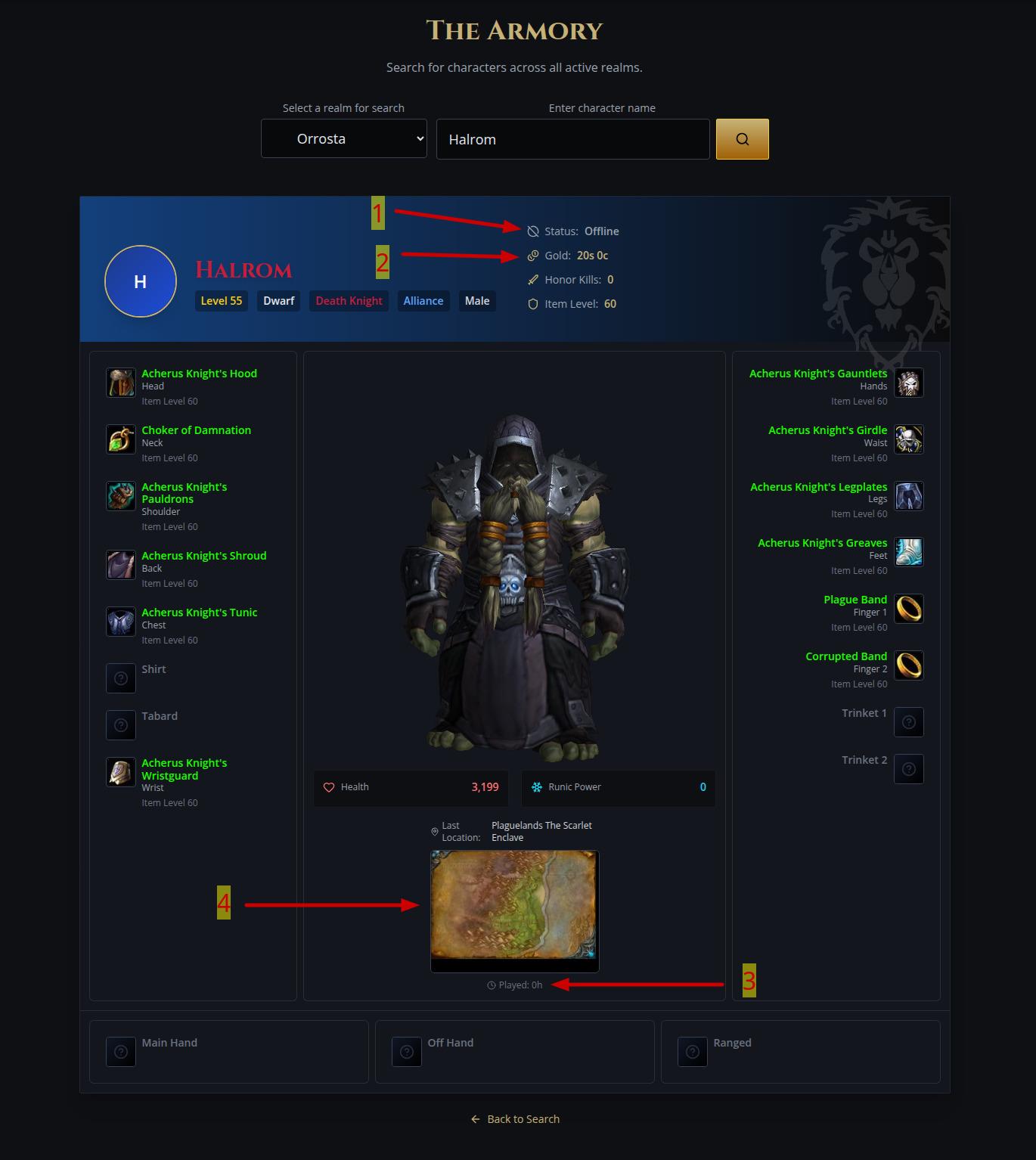
最后一个帖子由 Eirik - 4月 20, 2026, 03:10 上午Select any from the enabled Realms and type in the name of the Character to search for it.
If found, it will display the fully equipped character in 3D, along with all the equipped items in their corresponding slots.
Move your mouse over the slots and it will display the details of the equipped item in the slot.
Use your mouse buttons and wheel on your character to move it or zoom in or out. Double click to see your character in 3D and full screen.
The last location map is not exactly shown on purpose. Only the region of the last location of the character is shown, but not the exact location. This is to preserve some "privacy" of the character and to prevent squatting by other players.
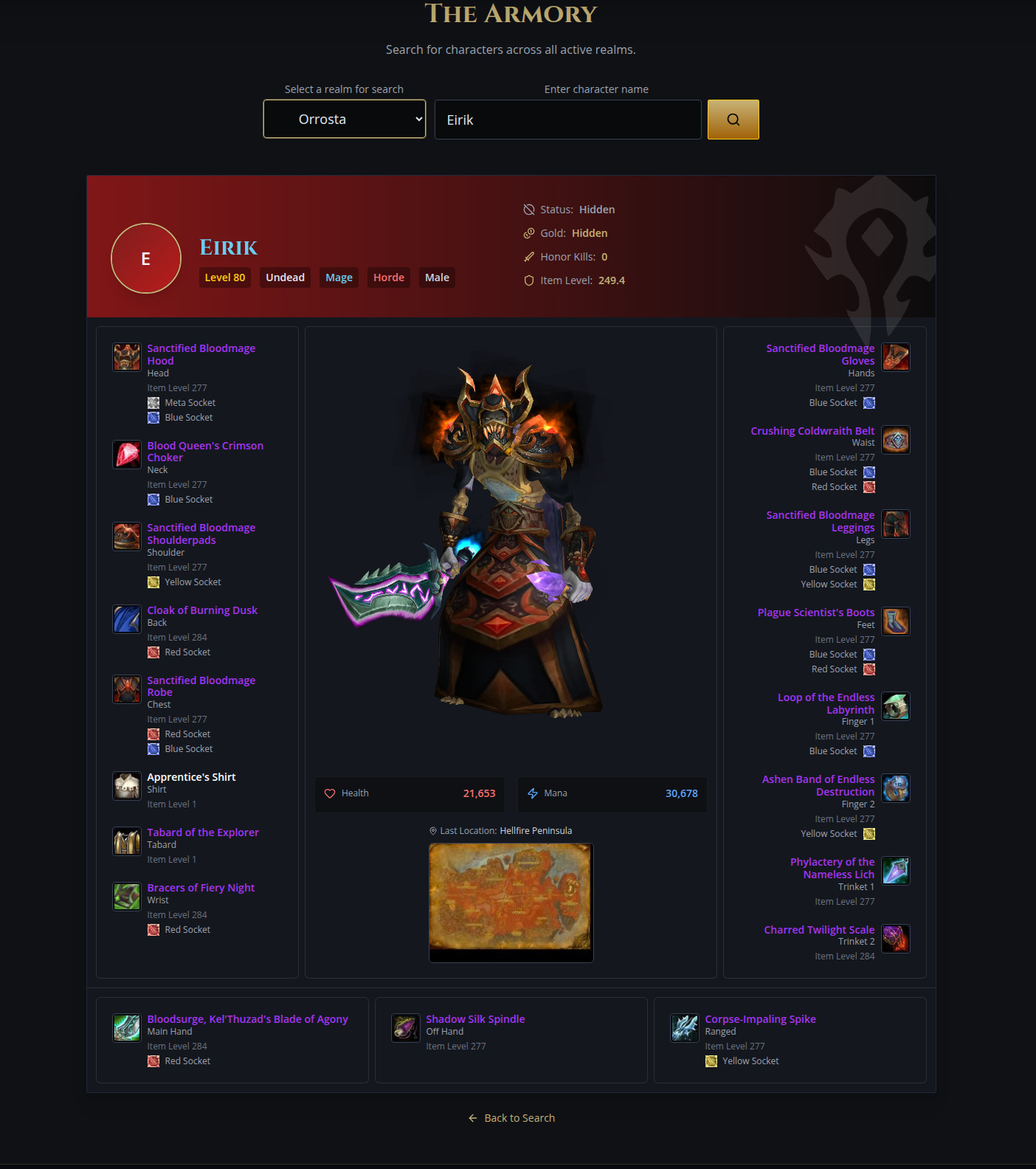
Click to open image in a new tab.
Privacy settings of the character
There are two different locations where you can adjust some details of your character shown in the armory.
1. You can access all your characters from this link.
Here you can select what is shown or hidden in the armory view of your character.
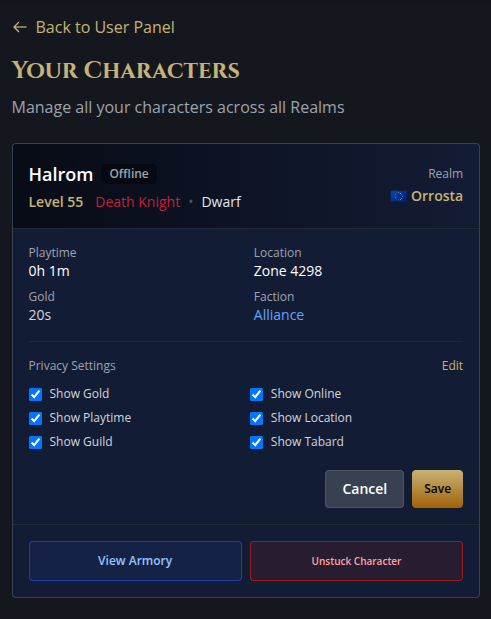
There is also a button to unstuck your character. If you are in trouble and you are stuck somewhere you can't get out from, ALWAYS try to unstuck your character ingame first. ONLY use this button as the absolut last resort as this will move your character to the starting point of your adventure!
Click to open image in a new tab.
2. You also can access the character settings from this link.
Here you also can copy a direct link to your character in the armory for posting on social media or other message boards.

Click to open image in a new tab.
If found, it will display the fully equipped character in 3D, along with all the equipped items in their corresponding slots.
Move your mouse over the slots and it will display the details of the equipped item in the slot.
Use your mouse buttons and wheel on your character to move it or zoom in or out. Double click to see your character in 3D and full screen.
The last location map is not exactly shown on purpose. Only the region of the last location of the character is shown, but not the exact location. This is to preserve some "privacy" of the character and to prevent squatting by other players.
Click to open image in a new tab.
Privacy settings of the character
There are two different locations where you can adjust some details of your character shown in the armory.
1. You can access all your characters from this link.
Here you can select what is shown or hidden in the armory view of your character.
- Show or hide the online status of your character.
- Show or hide the amount of Gold you amassed during your adventure.
- Show or hide the time played with this character.
- Show or completely hide the last location and map of the character.
- Show or hide the guild you are member of.
- Show or hide your tabard in the 3D view.
There is also a button to unstuck your character. If you are in trouble and you are stuck somewhere you can't get out from, ALWAYS try to unstuck your character ingame first. ONLY use this button as the absolut last resort as this will move your character to the starting point of your adventure!
Click to open image in a new tab.
2. You also can access the character settings from this link.
Here you also can copy a direct link to your character in the armory for posting on social media or other message boards.
Click to open image in a new tab.
#76
Help & Support / How does the shop work?
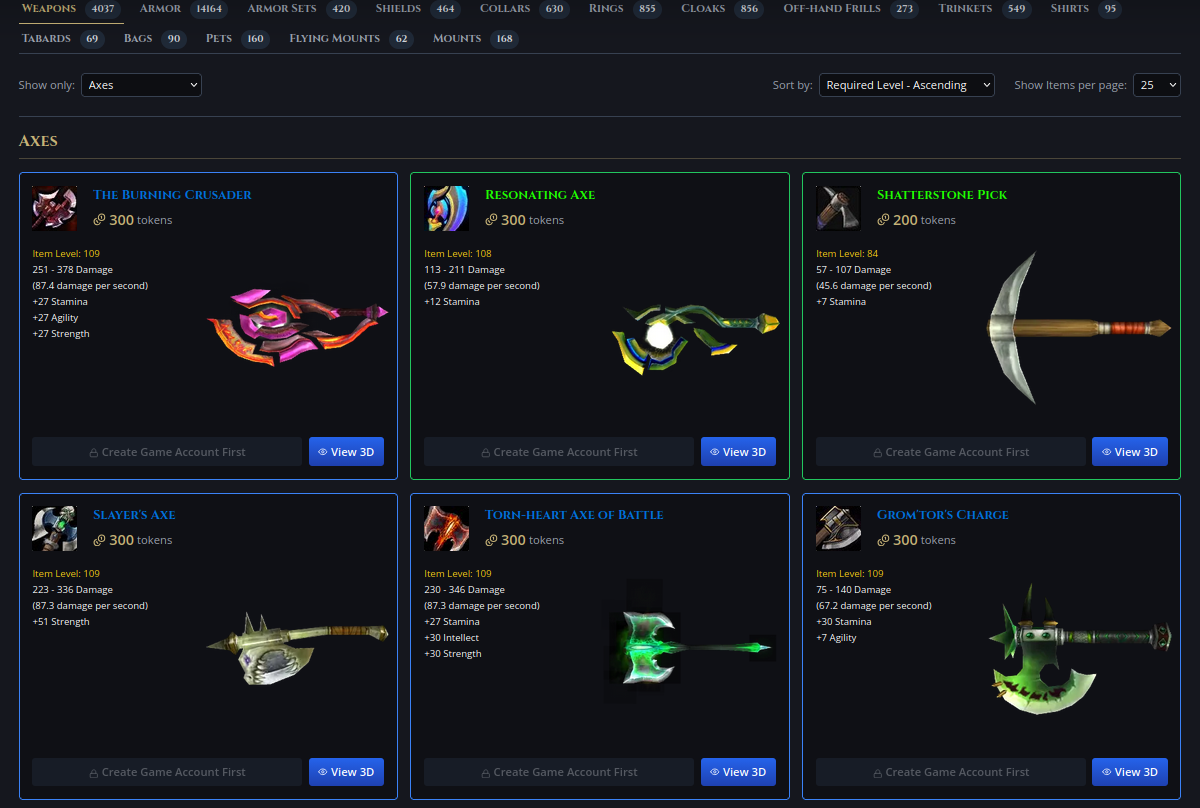
最后一个帖子由 Eirik - 4月 20, 2026, 02:05 上午Browse categories and items.
If you don't have an account or character on the selected shop, a default character will be used, so you can see how the item "looks on a character". All buy now buttons are naturally disabled.
If an account of you was found on the selected shop, your first character will be automatically selected, so you can see how the item looks on your character. You can change your character in the dropdown if you have more on the server.
If an item can not be equipped or used by your character, the buy now buttons are automatically disabled.
Click to open image in a new tab.
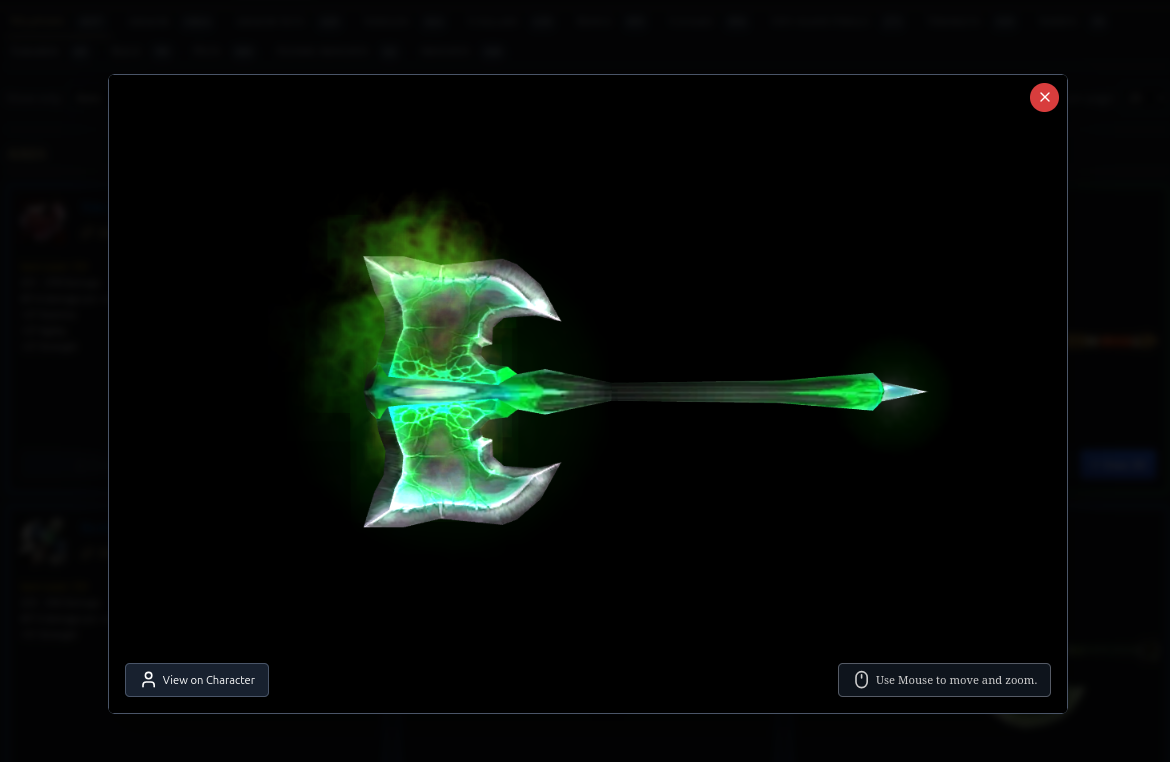
You can view the items in 3D by clicking the "View 3D" button. Use your mouse buttons and wheel to move or zoom the item. You also can double click for a fullscreen view.
Click to open image in a new tab.
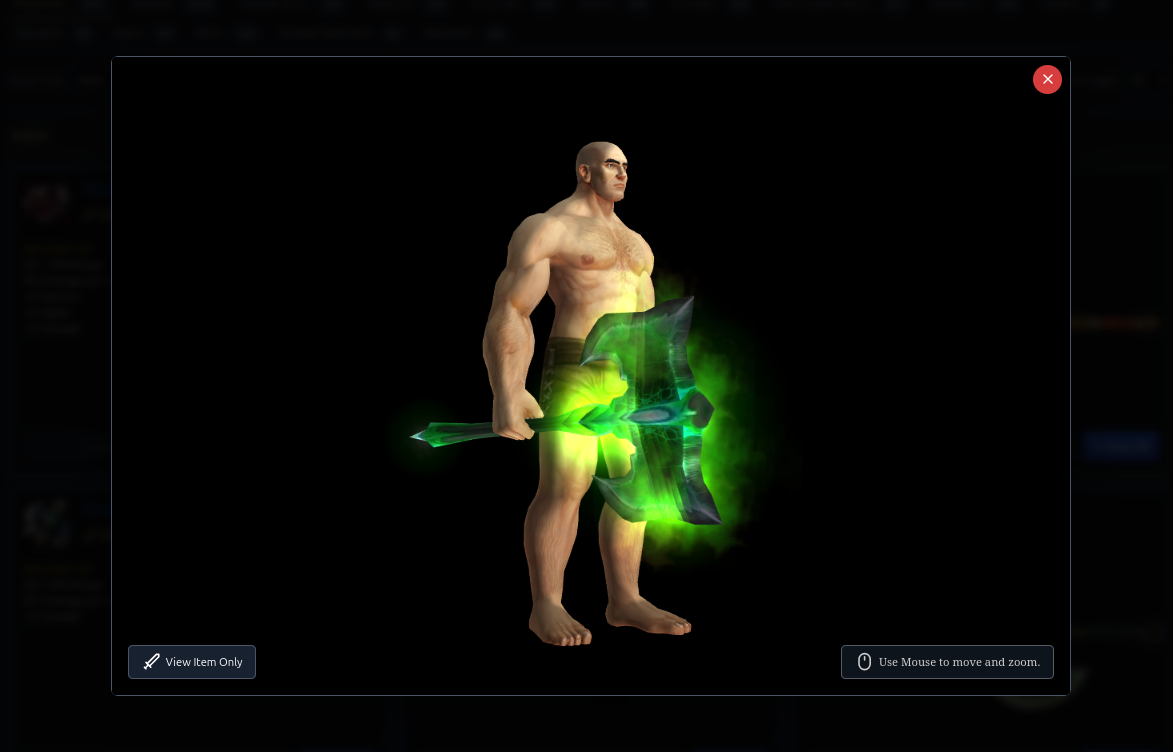
By clicking on "View on Character" the item will be equipped to your character. You also can double click for a fullscreen view.
Click to open image in a new tab.
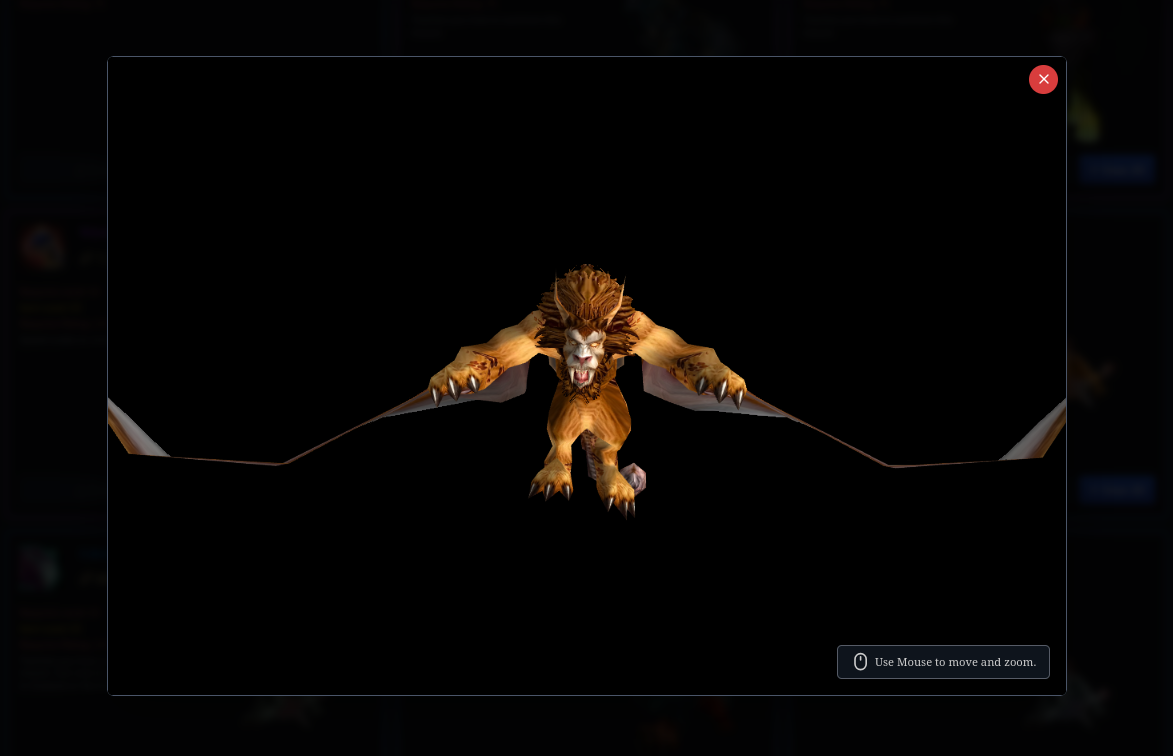
You can also view flying mounts flying in 3D.
Click to open image in a new tab.
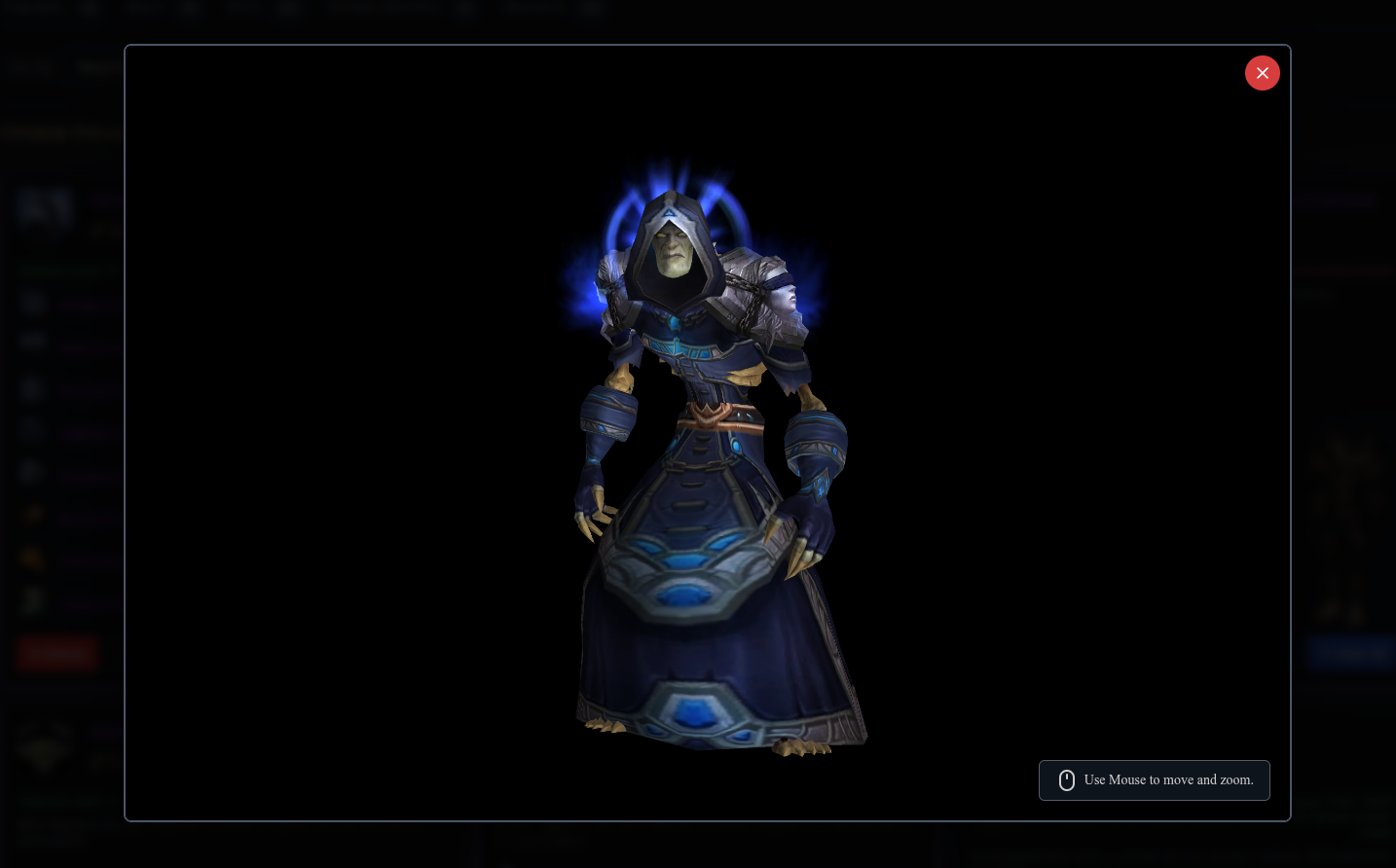
Viewing an complete Armor set how it looks on the character in 3D.
Click to open image in a new tab.
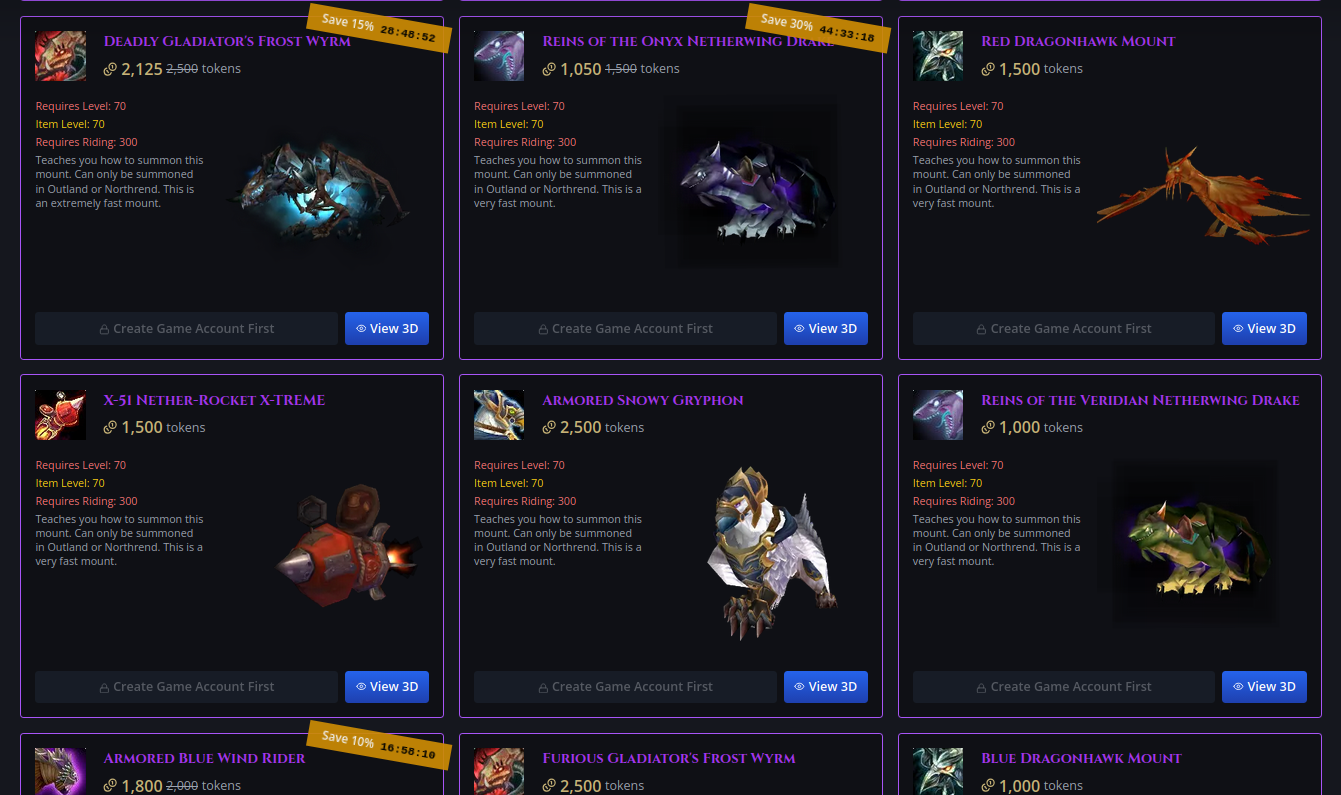
There are ALWAYS over 1500 items discounted! Check it out!
Click to open image in a new tab.
When you purchase an item, it will be send automatically to your ingame mailbox of your character. Go to the next mailbox to get your purchased item. Sometimes it takes a couple of minutes until it arrives.
If you don't have an account or character on the selected shop, a default character will be used, so you can see how the item "looks on a character". All buy now buttons are naturally disabled.
If an account of you was found on the selected shop, your first character will be automatically selected, so you can see how the item looks on your character. You can change your character in the dropdown if you have more on the server.
If an item can not be equipped or used by your character, the buy now buttons are automatically disabled.
Click to open image in a new tab.
You can view the items in 3D by clicking the "View 3D" button. Use your mouse buttons and wheel to move or zoom the item. You also can double click for a fullscreen view.
Click to open image in a new tab.
By clicking on "View on Character" the item will be equipped to your character. You also can double click for a fullscreen view.
Click to open image in a new tab.
You can also view flying mounts flying in 3D.
Click to open image in a new tab.
Viewing an complete Armor set how it looks on the character in 3D.
Click to open image in a new tab.
There are ALWAYS over 1500 items discounted! Check it out!
Click to open image in a new tab.
When you purchase an item, it will be send automatically to your ingame mailbox of your character. Go to the next mailbox to get your purchased item. Sometimes it takes a couple of minutes until it arrives.
#77
Important Information / Information about Tokens
最后一个帖子由 Eirik - 4月 19, 2026, 09:39 下午You can get tokens to buy items in the shop by different means:
1. You can earn tokens by voting for the Krigsgaldr Project on different Toplist Ranking sites. The more votes we get from you, the higher we get in the rankings on these Toplists, the more player come and the more fun you have. It's that simple.
2. You can earn tokens by inviting your friends or post invitation links on other boards or social media. DO NOT spam and only post where you are allowed to.
If we get repeatedly complaints about you spamming, we deserve the right to disable your ability to send invitations and/or to generate invitation links! We also reserve the right to suspend your account in very grave cases, but this will be decided on a case by case basis.
3. You can earn tokens by simply playing. Tokens for playing are awarded automatically to your account at midnight.
In the near future we will also award tokens for special events we will run regularly. This is worked on already.
In the more distant future we might consider to give tokens to donators. However our "NO PAY TO WIN" or "NO PAY TO PLAY" policy applies!
NOTE: SOME OF THESE TOPLIST RANKING SITES are not very reliable and often error or simply have problems with their backend and callback scripts which don't work and affect the automated awarding of tokens to your account:
There is a detailed log in your control panel of tokens awarded for voting. If there are too many "Pending" votes, please open a ticket to claim your tokens.
1. You can earn tokens by voting for the Krigsgaldr Project on different Toplist Ranking sites. The more votes we get from you, the higher we get in the rankings on these Toplists, the more player come and the more fun you have. It's that simple.
2. You can earn tokens by inviting your friends or post invitation links on other boards or social media. DO NOT spam and only post where you are allowed to.
If we get repeatedly complaints about you spamming, we deserve the right to disable your ability to send invitations and/or to generate invitation links! We also reserve the right to suspend your account in very grave cases, but this will be decided on a case by case basis.
3. You can earn tokens by simply playing. Tokens for playing are awarded automatically to your account at midnight.
In the near future we will also award tokens for special events we will run regularly. This is worked on already.
In the more distant future we might consider to give tokens to donators. However our "NO PAY TO WIN" or "NO PAY TO PLAY" policy applies!
NOTE: SOME OF THESE TOPLIST RANKING SITES are not very reliable and often error or simply have problems with their backend and callback scripts which don't work and affect the automated awarding of tokens to your account:
There is a detailed log in your control panel of tokens awarded for voting. If there are too many "Pending" votes, please open a ticket to claim your tokens.
#78
Important Information / Important information about th...
最后一个帖子由 Eirik - 4月 19, 2026, 09:39 下午Since we opened the shop in March, we have received a lot of positive feedback but also questions from players regarding if the Krigsgaldr Project has become a "pay to win" or "pay to play" host.
The short answer is:
NO, the Krigsgaldr Project has NOT become a "pay to play" or "pay to win host"!
The short answer is:
NO, the Krigsgaldr Project has NOT become a "pay to play" or "pay to win host"!
- Items in the shop can not be bought for money but for tokens which you can earn through various means. More info about how to obtain them.
- All items in the shop can also be achieved ingame by normal gameplay.
- There are no items in the shop which require a special relation to any faction.
- There are no items in the shop which require a special profession.
- There are no Heroic items in the shop. To equip and wear heroic items we feel that you should show that you are a real hero by doing the quests or raids necessary to gain the item and proudly show off your achievements.
- In the future we might offer "Donor Items". These will be items which only can be obtained by donors and will not be available ingame as rewards for quests and raids. However, these items will be marked as donor items and will not give the owner any advantage over other players to make it a fair play for everyone.
#79
Important Information / How to play on Legion Realms (...
最后一个帖子由 Eirik - 4月 19, 2026, 09:38 下午The "Einherjar" server, Legion 7.3.5, Rev. 26792, is currently in a closed "Beta" state and only available to selected players to test it's stability and errors before it will be available for the public.
Planned opening is in the last days of the second quarter of 2026. Watch your email. We will notify you as soon as you can play on it.
However, feel free to apply for Beta-Testing the server. To do so, open a ticket, select "Technical" from the category menu and drop us a line why we should choose you to play on the test server. Note that you need Legion 7.3.5, Rev. 26792 installed with a patched wow.exe which allows to connect to private servers. When accepted we will contact you with the login details.
Click to open the image in a new tab.
Planned opening is in the last days of the second quarter of 2026. Watch your email. We will notify you as soon as you can play on it.
However, feel free to apply for Beta-Testing the server. To do so, open a ticket, select "Technical" from the category menu and drop us a line why we should choose you to play on the test server. Note that you need Legion 7.3.5, Rev. 26792 installed with a patched wow.exe which allows to connect to private servers. When accepted we will contact you with the login details.
Click to open the image in a new tab.
#80
Important Information / How to play on Wrath of the Li...
最后一个帖子由 Eirik - 4月 19, 2026, 04:55 下午There are several ways to play on the WOTLK Realms. (Currently "Orrosta")
1. You already have Wrath of the Lich King installed. Make sure you have version 3.3.5, Revision 12340
Click to open image in a new tab.
Open config.wtf which is inside the "WTF" directory where your WOW is installed.
SET realmList "logon.krigsgaldr.net"
Download client updates (if any), specific for our WOTLK servers and place them into the Data directory.
Make sure you have created an Account on the server you want to play on from your control panel.
2. You want to play but don't have a game client.
Download one at the links below. If you can not extract the archive we recommend 7zip which you can download here.
NOTE: THIS IS ONLY THE GAME CLIENT AND WILL NOT WORK WITHOUT LANGUAGE FILES!!! YOU ALSO NEED TO DOWNLOAD THE LANGUAGE FILES FOR YOUR LANGUAGE BELOW, EXTRACT THE ARCHIVE AND PLACE THE RESULTING FOLDER INTO THE DATA DIRECTORY OF YOUR GAME CLIENT!!!
Game client for Windows, WOTLK 3.3.5, 12340 (Download ALL files):
Download at MEGA
Alternative download via torrent (One file):
Game client for MAC , WOTLK 3.3.5, 12340 (Note. This version is unsupported and might not work with an updated modern MAC-OS. Try it out, otherwise you may have to find a workaround to use the Windows version). (Download ALL files):
Download at MEGA
Alternative download via torrent (One file):
Download client updates (if any), specific for our WOTLK servers and place them into the Data directory.
Make sure you have created an Account on the server you want to play on from your control panel.
Language files:
deDE 🇩🇪 (Deutsch), (You need to download ALL files!)
Download at MEGA
Alternative download via torrent (One file):
enGB 🇬🇧 (British English), (You need to download ALL files!)
Download at MEGA
Alternative download via torrent (One file):
enUS 🇺🇸 (American English), (You need to download ALL files!)
Download at MEGA
Alternative download via torrent (One file):
esES 🇪🇸 (Español Europeo), (You need to download ALL files!)
Download at MEGA
Alternative download via torrent (One file):
esMX 🇲🇽 (Español Latino), (You need to download ALL files!)
Download at MEGA
Alternative download via torrent (One file):
frFR 🇫🇷 (Français), (You need to download ALL files!)
Download at MEGA
Alternative download via torrent (One file):
ruRU 🇷🇺 (Русский), (You need to download ALL files!)
Download at MEGA
Alternative download via torrent (One file):
koKR 🇰🇷 (한국어), (You need to download ALL files!)
Download at MEGA
Alternative download via torrent (One file):
zhCN 🇨🇳 (简体中文), (You need to download ALL files!)
Download at MEGA
Alternative download via torrent (One file):
1. You already have Wrath of the Lich King installed. Make sure you have version 3.3.5, Revision 12340
Click to open image in a new tab.
Open config.wtf which is inside the "WTF" directory where your WOW is installed.
代码 [选择]
        📁  World of Warcraft/
        │
        ├── 🔧 Wow.exe (and other game files)
        │
        ├── 📁 Data/
        │    │  └── Place update patches here
        │    │
        │    └─ 📁 enUS/
        │      │
        │      ├── 📁 Documentation
        │      │        └── Contains Manuals for first time Players of WOW
        │      ├── 📁 Interface
        │      │        └── Contains game files
        │      └── All language files
        │
        ├── 📁 Interface/
        │        └── 📁 Addons
        │                └── Place Addons here
        │
        └── 📁 WTF/
                └── Config.wtf
Make sure the first line looks exactly like this:SET realmList "logon.krigsgaldr.net"
Download client updates (if any), specific for our WOTLK servers and place them into the Data directory.
Make sure you have created an Account on the server you want to play on from your control panel.
2. You want to play but don't have a game client.
Download one at the links below. If you can not extract the archive we recommend 7zip which you can download here.
NOTE: THIS IS ONLY THE GAME CLIENT AND WILL NOT WORK WITHOUT LANGUAGE FILES!!! YOU ALSO NEED TO DOWNLOAD THE LANGUAGE FILES FOR YOUR LANGUAGE BELOW, EXTRACT THE ARCHIVE AND PLACE THE RESULTING FOLDER INTO THE DATA DIRECTORY OF YOUR GAME CLIENT!!!
Game client for Windows, WOTLK 3.3.5, 12340 (Download ALL files):
Download at
MEGAAlternative download via torrent (One file):
Game client for MAC , WOTLK 3.3.5, 12340 (Note. This version is unsupported and might not work with an updated modern MAC-OS. Try it out, otherwise you may have to find a workaround to use the Windows version). (Download ALL files):
Download at
MEGAAlternative download via torrent (One file):
Download client updates (if any), specific for our WOTLK servers and place them into the Data directory.
Make sure you have created an Account on the server you want to play on from your control panel.
Language files:
deDE 🇩🇪 (Deutsch), (You need to download ALL files!)
Download at
MEGAAlternative download via torrent (One file):
enGB 🇬🇧 (British English), (You need to download ALL files!)
Download at
MEGAAlternative download via torrent (One file):
enUS 🇺🇸 (American English), (You need to download ALL files!)
Download at
MEGAAlternative download via torrent (One file):
esES 🇪🇸 (Español Europeo), (You need to download ALL files!)
Download at
MEGAAlternative download via torrent (One file):
esMX 🇲🇽 (Español Latino), (You need to download ALL files!)
Download at
MEGAAlternative download via torrent (One file):
frFR 🇫🇷 (Français), (You need to download ALL files!)
Download at
MEGAAlternative download via torrent (One file):
ruRU 🇷🇺 (Русский), (You need to download ALL files!)
Download at
MEGAAlternative download via torrent (One file):
koKR 🇰🇷 (한국어), (You need to download ALL files!)
Download at
MEGAAlternative download via torrent (One file):
zhCN 🇨🇳 (简体中文), (You need to download ALL files!)
Download at
MEGAAlternative download via torrent (One file):